
Review: Asus’ Taichi ultrabook-tablet
SINGAPORE — The launch of Microsoft’s Windows 8 has released a deluge of tablet-PC hybrids that try to leverage on the touch-friendly operating system.
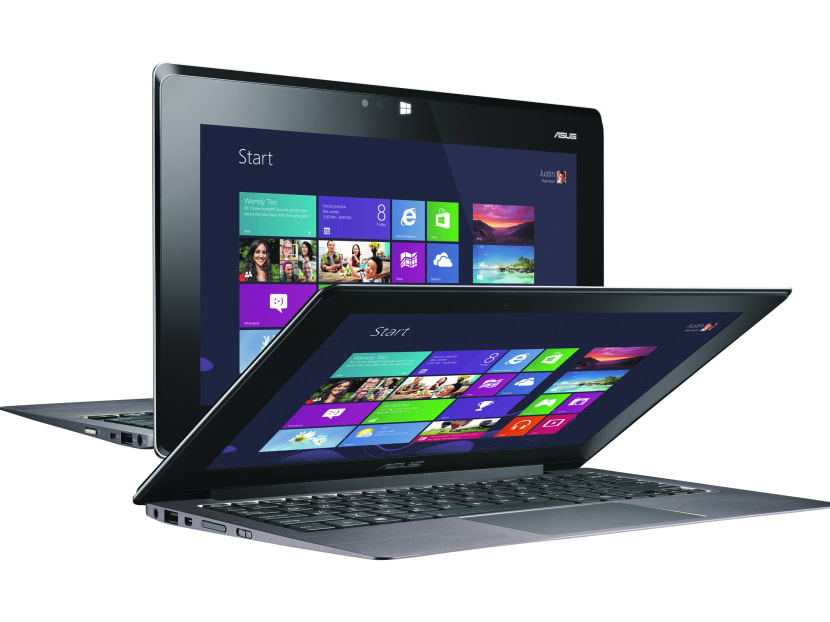
Asus’ dual screen Taichi ultrabook-tablet hybrid.
Photo: ASUS


SINGAPORE — The launch of Microsoft’s Windows 8 has released a deluge of tablet-PC hybrids that try to leverage on the touch-friendly operating system.
I have seen screens that swivel as well as those that detach from the keyboard to transform from PC to tablet, but the Asus Taichi’s dual-screen concept offers an interesting option.
By placing screens on both sides of the ultrabook’s cover, you can open the cover to use it like a traditional PC or close it to use it as a tablet.
The Taichi comes in variations with 11.6-inch and 13.3-inch screens, powered by Intel Core i5-3317U, Core i7-3517U processors — running on Windows 8, of course.
I had the 11.6-inch version with Intel Core i7-3517U, 1.9GHz, which was responsive and loaded up games, videos and websites with relative ease. It also handled switching between multiple apps without sputtering.
The battery is touted to have an impressive two-week standby time and, indeed, I had it on standby for a week and the battery percentage had hardly dropped. However, once you turn it on and push it to its limits, the battery will give up in about three to four hours. Less, if you employ the Screen Share.
Screen Share, as the name implies, lets you share your screen with friends or clients during a presentation. Lift the screen and start the Screen Share app; now you are able to drag and drop documents and media files, such as videos and photos, to share them with friends. They can also use the touchscreen to go to apps or surf the Internet. Unfortunately, both screens cannot be used independently, so you cannot work on your deadlines while your friend shops online.
Both the Taichi’s screens are IPS Full HD (1920 x 1080), but only the outside screen is a 10-point multi-touchscreen. Asus said it may consider providing dual touchscreens if the market requires it. The outside screen is a Corning FIT screen, so you can be assured of its durability.
However, unlike hybrids that detach, the Taichi does not let you take pictures while looking through it in tablet mode. You can lift the screen to shoot your surroundings with its 5-megapixel front camera or yourself in tablet mode. A second 720p HD camera provides decent quality for video chats.
As a tablet, the Taichi’s 1.25kg is a tad heavy (about twice that of the iPad) even when compared to some 13-inch ultrabooks. It also does not lend itself well to one-hand use but, to be honest, its weight does not negate its tablet feasibility. Some people may have an issue about a notebook with an 11.6-inch screen or a tablet with a 13.3-inch screen (especially in this age of 7-inch mini tablets) but I rather enjoyed the versatility that the Taichi provided.
If you want a tablet with a removable keyboard, you may prefer detachable hybrids or just looking at getting third party keyboards for your tablets. But if you want an ultrabook that can work as a tablet, the Taichi is an option worth looking into.
The Taichi retails from S$2,698 at all Asus authorised retailers.
Stay in the know. Anytime. Anywhere.

Subscribe to our newsletter for the top features, insights and must reads delivered straight to your inbox.
By clicking subscribe, I agree for my personal data to be used to send me TODAY newsletters, promotional offers and for research and analysis.